nantikan kemunculan Project Alpha in Astro featuring me & jojo
Tuesday, August 18, 2009
Thursday, July 30, 2009
ssh tips
most of our servers have timeout for ssh connections or probably the routers or firewalls configured to cut the connections if no data is transferred in either direction after a certain time interval, basically by the time i came back from lunch, all ssh connections will be disconnected. sucks right?
there are 2 ways to prevent this to happen. either do it from the servers or clients side.
1st way: reconfigure sshd on the servers like this:
edit /etc/ssh/sshd_config put ClientAliveInterval 60
and don’t forget to restart sshd on the server;)
2nd way: if you have a bunch lot of servers, i bet you don't want to edit all the servers configs. the easier way is to configure on the client end.
so now i can have a longer lunch break huhuhuhuu ;)
oh btw, i've dumped putty + PuTTY Connection Manager, now using cygwin + puttycyg.
with puttycyg, at least u're not stuck with the crap "cmd.exe" windows that comes with cygwin, unless u install Cygwin/X lor. betul dak jep?

1 more thing, ssh to outside world is block from within our company network. here is the trick - reconfigure your sshd to run on port 443. on cygwin install corkscrew, then put these in the ~/.ssh/config
Host outside_server
ProxyCommand corkscrew your_company_proxy_ip 8080 %h 443
$ ssh outside_server
Password:
walla you're now on outside world!
again, if u're using putty - under Connection - Proxy. oh thanks to apai!
there are 2 ways to prevent this to happen. either do it from the servers or clients side.
1st way: reconfigure sshd on the servers like this:
edit /etc/ssh/sshd_config put ClientAliveInterval 60
and don’t forget to restart sshd on the server;)
2nd way: if you have a bunch lot of servers, i bet you don't want to edit all the servers configs. the easier way is to configure on the client end.
- if your're using linux desktop edit /etc/ssh/ssh_config and add the line:
ServerAliveInterval 60
- if you're using putty - under Connection, put non-zero value for:
Seconds between keepalives (0 to turn off). eg. 60
- if you're using cygwin edit ~/.ssh/config and add these lines:
Host *
TCPKeepAlive no
ServerAliveInterval 60
or u just can put below options when execute ssh command:
$ ssh -o TCPKeepAlive=no -o ServerAliveInterval=60 servername
ServerAliveInterval 60
- if you're using putty - under Connection, put non-zero value for:
Seconds between keepalives (0 to turn off). eg. 60
- if you're using cygwin edit ~/.ssh/config and add these lines:
Host *
TCPKeepAlive no
ServerAliveInterval 60
or u just can put below options when execute ssh command:
$ ssh -o TCPKeepAlive=no -o ServerAliveInterval=60 servername
so now i can have a longer lunch break huhuhuhuu ;)
oh btw, i've dumped putty + PuTTY Connection Manager, now using cygwin + puttycyg.
with puttycyg, at least u're not stuck with the crap "cmd.exe" windows that comes with cygwin, unless u install Cygwin/X lor. betul dak jep?
1 more thing, ssh to outside world is block from within our company network. here is the trick - reconfigure your sshd to run on port 443. on cygwin install corkscrew, then put these in the ~/.ssh/config
Host outside_server
ProxyCommand corkscrew your_company_proxy_ip 8080 %h 443
$ ssh outside_server
Password:
walla you're now on outside world!
again, if u're using putty - under Connection - Proxy. oh thanks to apai!
p/s: wife aku dok komplen "ape yg awk dok buat ngan screen hitam tu, tak ceria langsung..." eh hitam bukan sebarang hitam ya ;)
Monday, July 27, 2009
Victoria’s Secret SALE!!!
i'm now into online business :)
for those looking for Victoria’s Secret products go to Victoria’s Secret SALE!!!

for those looking for Victoria’s Secret products go to Victoria’s Secret SALE!!!

for other products such as PAC Beauty, Biore Cleansing Oil, Sutera Terengganu, Gin & Jacqie Bags etc go to Shop@RM
So ape lagi, belikan la utk bini/girlfriend/mistress korang hehehehe. Thanks.
p/s: VS nyer bau mmg very the sexy... sure naik nafsu syahwat! utk yg berumahtangga sahaja!!! tu belum lingerie dia lagi huhuhu :P
So ape lagi, belikan la utk bini/girlfriend/
p/s: VS nyer bau mmg very the sexy... sure naik nafsu syahwat! utk yg berumahtangga sahaja!!! tu belum lingerie dia lagi huhuhu :P
Monday, June 22, 2009
its 4mb now
speedtest from www.p1.com.myafter a week waiting for technician to come to upgrade my streamyx, now its finally 4mb yeyyy ;)
currently TM has promotion for this package for only rm160/month. before i was paying rm88/month plus italk voice plan rm38/month total up rm126.
speedtest from www.speedtest.nettogether with this 4mb package i choose the rm10/month for my voice plan, so just additional rm44 monthly. on top of that i got free wireless router plus free cordless phone. good deal kan?
now me happily youtubing... even from wireless connection, youtube seems smoothly streaming, tak de la tersekat2 :P kalo tersekat pung tak la berjanggut nak tunggu cam dulu ;)
ooo torrent lom test lagi ni... nanti2 la...
p/s: tapi cordless phone tak dapat lagi ni iskk iskk... boleh stok tak dak lak? pe citer ni TM?
now me happily youtubing... even from wireless connection, youtube seems smoothly streaming, tak de la tersekat2 :P kalo tersekat pung tak la berjanggut nak tunggu cam dulu ;)
ooo torrent lom test lagi ni... nanti2 la...
p/s: tapi cordless phone tak dapat lagi ni iskk iskk... boleh stok tak dak lak? pe citer ni TM?
Tuesday, June 16, 2009
blackberry as modem
all this while i never bothered to configure my blackberry to be a modem. probably the reason was my laptop is company property, malas la nak godek barang orang ni. plus legal admin right pun takde for the laptop (illegal or backdoor ade la hehehehe sssyhhhhhh)
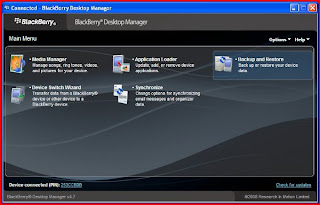
but since we bought our new Lenovo netbook, semangat la sket nak menggodek. here are the steps how to turn your blackberry to be a modem. mine is Curve 8310.1. install BlackBerry Desktop Manager. download here.
- once installed, connect your berry to your laptop & launch the apps. make sure the status "Connected" like pic above.
- there should be some messages "BlackBerry IP Modem, Research In Motion bla bla bla..."
put this line into that column:
- for MAXIS = at+cgdcont=1,"IP","net"
- for CELCOM = at+cgdcont=1,”ip”,”celcom3g”
- select Create a new connections -> Next -> select Connect to the internet -> Next -> select Set up my connection manually -> select Connect using a dial up modem -> (if you have more than 1 modem, select the modem we configured just now)
- give the ISP Name eg. berry maxis
- in Phone number, put *99#
User name & Password:
for MAXIS put User name = maxis & Password = wap
for CELCOM = no need to key in any information, leave it blank.
once finished, double click the shortcut & Dial
the speed, hmmm not so bad & quite resonable la for surfing purpose. at least if desperate nak pakai internet & no reachable free wifi, boleh la pakai ni...
p/s: credits goes to sukablackberry
Subscribe to:
Posts (Atom)


